发布于 ,更新于 

开发QQ机器人的一些事

前言

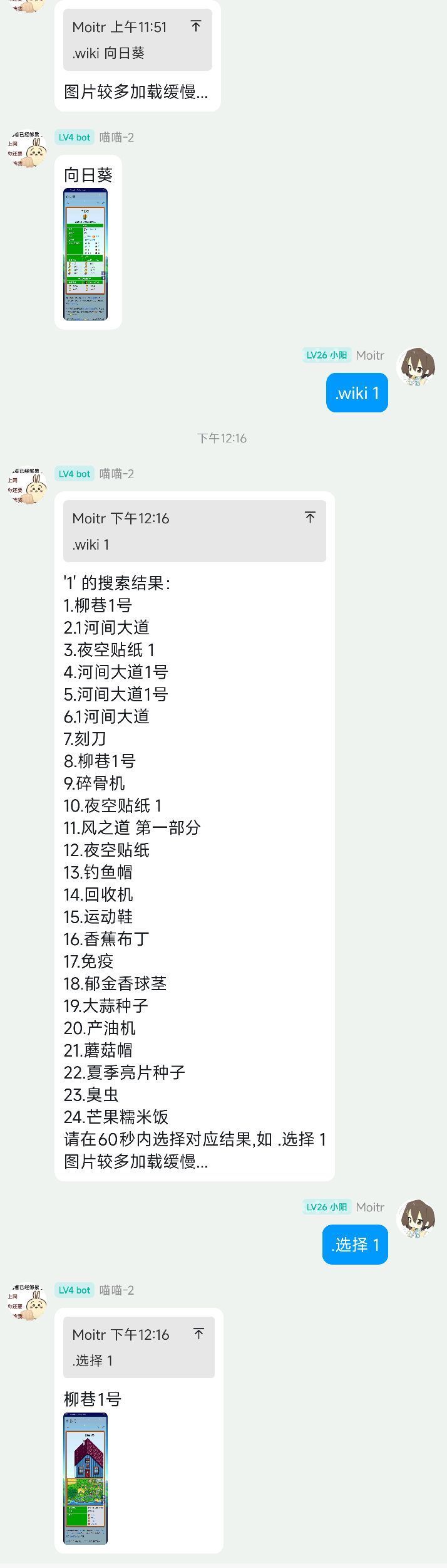
由于在游玩《星露谷物语》时频繁需要查阅Wiki获取游戏信息(如作物生长周期、村民喜好、配方解锁等),手动查询效率较低。为了提高游戏体验和信息获取效率,我决定开发一个专门针对星露谷Wiki的QQ机器人

开发

使用了llbot机器人框架和python进行开发

主程序部分

1
2
3
4
5
6
7
8
9
10
11
12
13
14
15
16
17
18
19
20
21
22
23
24
25
26
27
28
29
30
31
32
33
34
35
36
37
38
39
40
41
42
43
44
45
46
47
48
49
50
51
52
53
54
55
56
57
58
59
60
61
62
63
64
65
66
67
68
69
70
71
72
73
74
75
76
77
78
79
80
81
82
83
84
85
86
87
88
89
90
91
92
93
94
95
96
97
98
99
100
101
102
103
104
105
106
107
108
109
110
111
112
113
114
115
116
117
118
119
120
121
122
123
124
125
126
127
128
129
130
131
132
133
134
135
136
137
138
139
140
141
142
143
144
145
146
147
148
149
150
151
152
153
154
155
156
157
158
159
160
161
162
163
164
165
166
167
168
169
170
171
172
173
174
175
176
177
178
179
180
181
182
183
184
185
186
187
188
189
190
191
192
193
194
195
196
197
198
199
200
201
202
203
204
205
206
207
208
209
210
211
212
213
214
215
216
217
218
219
220
221
222
223
224
225
226
227
228
229
230
231
232
233
234
235
236
237
238
239
240
241
242
243
244
245
246
247
248
249
250
251
252
253
254
255
256
257
258
259
260
261
import uuid
import asyncio
import json
import websockets
import wiki
import base64


ip = "127.0.0.1:3001"
access_token = "your_access_token"

wiki_waiting_tags = {} # {(group_id, user_id): result}

async def async_input(prompt: str = "") -> str:
loop = asyncio.get_event_loop()
return await loop.run_in_executor(None, input, prompt)


# Wiki 指令处理
async def handle_wiki(message, group_id, message_id, user_id):
if message and message.lower().startswith(".wiki "):
search_content = message[6:].strip()
if search_content:
result = await wiki.Search(search_content)
tag_key = (group_id, user_id)
wiki_waiting_tags[tag_key] = result
if result['type'] == 0:
await API.send_message(1, group_id, message_id, "图片较多加载缓慢...")
image = await wiki.SearchResult(result['results'][0]['full_url'])
print(image)
if image == -1:
await API.send_message(1, group_id, message_id, "请重试喵~")
del wiki_waiting_tags[tag_key]
return

await API.send_image_message(1, group_id,message_id,search_content, image)
del wiki_waiting_tags[tag_key]
return
else:
await API.send_message(1, group_id, message_id, result['text'] + '\n请在60秒内选择对应结果,如 .选择 1\n图片较多加载缓慢...')

# 创建60秒倒计时任务
async def countdown_message():
await asyncio.sleep(60)
if tag_key in wiki_waiting_tags:
await API.send_message(1, group_id, message_id, "回复超时!")
del wiki_waiting_tags[tag_key]

asyncio.create_task(countdown_message())
else:
await API.send_message(1, group_id, message_id, "请输入要查询的内容,如 .Wiki 宝石")

# Wiki选择指令处理
async def choose_wiki(message, group_id, message_id, user_id):
if message and message.startswith(".选择 "):
tag_key = (group_id, user_id)

if tag_key not in wiki_waiting_tags:
await API.send_message(1, group_id, message_id, "没有待选择的查询结果,请先使用 .wiki 进行查询")
return

choice_content = message[4:].strip()
if choice_content:
try:
choice_num = int(choice_content)
result = wiki_waiting_tags[tag_key]
selected_result = result['results'][choice_num - 1]
selected_url = selected_result['full_url']
selected_title = selected_result['title']

if not result.get('results') or len(result['results']) == 0:
await API.send_message(1, group_id, message_id, "搜索结果无效")
del wiki_waiting_tags[tag_key]
return

if choice_num < 1 or choice_num > len(result['results']):
await API.send_message(1, group_id, message_id, f"请输入有效的数字(1-{len(result['results'])})")
return


image = await wiki.SearchResult(selected_url)
print(image)
if image == -1:
await API.send_message(1, group_id, message_id, "请重试喵~")
del wiki_waiting_tags[tag_key]
return
await API.send_image_message(1, group_id,message_id,selected_title, image)
del wiki_waiting_tags[tag_key]

except ValueError:
await API.send_message(1, group_id, message_id, "请输入有效的数字,如 .选择 1")
else:
await API.send_message(1, group_id, message_id, "请输入要处理的内容,如 .选择 1")

async def receive_messages(ws):
while True:
data = json.loads(await ws.recv())
print(data)
if data.get("message_type") == "group":
message_id = data.get("message_id")
message = data.get("message", [{}])[0].get("data", {}).get("text")
user_id = data.get("user_id")
group_id = data["group_id"]


if message and message and message.lower().startswith(".wiki "):
tag_key = (group_id, user_id)
if tag_key in wiki_waiting_tags:
await API.send_message(1, group_id, message_id, "上一个查询未完成!")
else:
await handle_wiki(message, group_id, message_id, user_id)
elif message and message.startswith(".选择 "):
await choose_wiki(message, group_id, message_id, user_id)
else:
pass


#API
class WebSocketClient:
def __init__(self, websocket):
self.websocket = websocket

@property
def echo(self):
return str(uuid.uuid4())

#发送消息
async def send_message(self, type, send_id, message_id, message):
if type == 1:
data = {
"action": "send_group_msg",
"params": {
"group_id": send_id,
"message": [
{
"type": "reply",
"data": {
"id": message_id
}
},
{
"type": "text",
"data": {
"text": f"{message}"
}
}
]
},
"echo": self.echo
}
else:
data = {
"action": "send_private_msg",
"params": {
"user_id": send_id,
"message": [
{
"type": "reply",
"data": {
"id": message_id
}
},
{
"type": "text",
"data": {
"text": f"{message}"
}
}
]
},
"echo": self.echo
}
await self.websocket.send(json.dumps(data))


#发送图片消息
async def send_image_message(self, type, send_id, message_id,message, image_path):
# 读取图片文件并转换为base64
try:
with open(image_path, 'rb') as image_file:
image_data = image_file.read()
image_base64 = base64.b64encode(image_data).decode('utf-8')
except Exception as e:
print(f"读取图片文件失败: {e}")
return

if type == 1:
data = {
"action": "send_group_msg",
"params": {
"group_id": send_id,
"message": [
{
"type": "reply",
"data": {
"id": message_id
}
},
{
"type": "text",
"data": {
"text": message
}
},
{
"type": "image",
"data": {
"file": f"base64://{image_base64}"
}
}
]
},
"echo": self.echo
}
else:
data = {
"action": "send_private_msg",
"params": {
"user_id": send_id,
"message": [
{
"type": "reply",
"data": {
"id": message_id
}
},
{
"type": "text",
"data": {
"text": message
}
},
{
"type": "image",
"data": {
"file": f"base64://{image_base64}"
}
}
]
},
"echo": self.echo
}
await self.websocket.send(json.dumps(data))


async def main():
uri = f"ws://{ip}?access_token={access_token}"
async with websockets.connect(uri) as websocket:
asyncio.create_task(receive_messages(websocket))
global API
API = WebSocketClient(websocket)
while True:
message = await async_input("输入消息内容: ")
await API.send_message(1, 710558175, None, message)

asyncio.run(main())

获取星露谷wiki信息部分

1
2
3
4
5
6
7
8
9
10
11
12
13
14
15
16
17
18
19
20
21
22
23
24
25
26
27
28
29
30
31
32
33
34
35
36
37
38
39
40
41
42
43
44
45
46
47
48
49
50
51
52
53
54
55
56
57
58
59
60
61
62
63
64
65
66
67
68
69
70
71
72
73
74
75
76
77
78
79
80
81
82
83
84
85
86
87
88
89
90
91
92
93
94
95
96
97
98
99
100
101
102
103
104
105
106
107
108
109
110
111
112
113
114
115
116
117
118
119
120
121
122
123
124
125
126
127
128
129
130
131
132
133
134
135
136
137
138
139
140
141
142
143
144
145
146
147
148
149
150
151
152
153
154
155
156
157
158
159
160
161
162
163
164
165
166
167
168
169
170
171
172
173
174
175
176
177
178
179
180
181
182
183
184
185
186
187
188
189
190
191
192
193
194
195
196
197
198
199
200
201
202
203
204
205
206
207
208
209
210
211
212
213
214
215
216
217
218
219
220
import aiohttp
from bs4 import BeautifulSoup
from playwright.async_api import async_playwright
import os
import asyncio


url = "https://zh.stardewvalleywiki.com"


async def Search(content):
SearchUrl = url + "/index.php?search=" + content
async with aiohttp.ClientSession() as session:
async with session.get(SearchUrl) as resp:
SearchResult = await resp.text()
# 获取最终URL,检查是否重定向到了条目页面
final_url = str(resp.url)

soup = BeautifulSoup(SearchResult, "lxml")
title_elements = soup.find_all(class_="mw-search-result-heading")

# 如果没有搜索结果,检查是否直接跳转到了条目页面
if not title_elements:
# 检查URL是否与搜索URL不同,说明发生了重定向
if final_url != SearchUrl:
page_title = soup.find(id="firstHeading")
if page_title:
title_text = page_title.get_text(strip=True)
# 排除搜索结果页面的标题
if title_text and "搜索结果" not in title_text and "Search results" not in title_text:
# 从URL构建条目链接
if '/index.php?title=' in final_url:
title_param = final_url.split('title=')[1].split('&')[0]
entry_url = url + "/index.php?title=" + title_param
else:
entry_url = final_url

return {
'text': f"找到条目:{title_text}\n链接:{entry_url}",
'results': [{
'title': title_text,
'full_url': entry_url
}],
'type': 0
}

# 确实没有找到
return {
'text': f"没有找到与 '{content}' 相关的Wiki条目。",
'results': []
}

results = []
formatted_lines = []
for element in title_elements:
link_tag = element.find('a')
title_text = link_tag.get_text(strip=True)
href = link_tag.get('href')
full_url = url + href if href.startswith('/') else href
results.append({
'title': title_text,
'full_url': full_url
})

for index, result in enumerate(results, 1):
line = f"{index}.{result['title']}"
formatted_lines.append(line)

output_str = f"'{content}' 的搜索结果:" + '\n' + '\n'.join(formatted_lines)
return {
'text': output_str,
'results': results,
'type': 1
}


async def SearchResult(full_url):
ERROR_CODE = -1
try:
screenshot_dir = "screenshots"
if not os.path.exists(screenshot_dir):
os.makedirs(screenshot_dir)

existing_files = [f for f in os.listdir(screenshot_dir) if f.endswith('.png')]
max_num = 0
for f in existing_files:
try:
num = int(f.replace('.png', ''))
max_num = max(max_num, num)
except:
pass
screenshot_path = os.path.join(screenshot_dir, f"{max_num + 1}.png")

async with async_playwright() as p:
browser = await p.chromium.launch(headless=True)

mobile_device = {
"viewport": {"width": 390, "height": 844},
"user_agent": "Mozilla/5.0 (iPhone; CPU iPhone OS 14_0 like Mac OS X) AppleWebKit/605.1.15 (KHTML, like Gecko) Version/14.0 Mobile/15E148 Safari/604.1",
"device_scale_factor": 3,
"is_mobile": True,
"has_touch": True
}

context = await browser.new_context(**mobile_device)
page = await context.new_page()

await page.goto(full_url, wait_until="networkidle", timeout=30000)
await page.wait_for_load_state("networkidle")

try:
expand_script = """
(function() {
let count = 0;
const clicked = new Set();

function click(element) {
if (!element || clicked.has(element) || element.offsetParent === null) return false;
try {
element.click();
clicked.add(element);
return true;
} catch(e) {}
return false;
}

document.querySelectorAll('.mw-collapsible, [class*="mw-collapsible"]').forEach(coll => {
if (coll.classList.contains('mw-collapsed')) {
const toggle = coll.querySelector('.mw-collapsible-toggle, [class*="toggle"]');
if (toggle && click(toggle)) count++;
}
});

document.querySelectorAll('button[aria-expanded="false"], [aria-expanded="false"]').forEach(btn => {
if (click(btn)) count++;
});

return count;
})();
"""

for _ in range(10):
if await page.evaluate(expand_script) == 0:
break
await asyncio.sleep(0.6)

# 等待展开后的内容加载
await page.wait_for_load_state("networkidle", timeout=15000)
await asyncio.sleep(1)

# 滚动页面以触发懒加载图片
page_height = await page.evaluate("document.documentElement.scrollHeight")
viewport_height = await page.evaluate("window.innerHeight")
scroll_step = int(viewport_height * 0.8)

current_pos = 0
while current_pos < page_height:
await page.evaluate(f"window.scrollTo(0, {current_pos})")
await asyncio.sleep(0.3)
current_pos += scroll_step

# 滚动回顶部
await page.evaluate("window.scrollTo(0, 0)")
await asyncio.sleep(0.5)

# 等待所有图片加载完成
max_wait_attempts = 15
for attempt in range(max_wait_attempts):
images_status = await page.evaluate("""
() => {
const images = Array.from(document.querySelectorAll('img'));
let loadingCount = 0;
images.forEach(img => {
// 检查图片是否加载完成
// complete 表示图片加载完成(成功或失败)
// naturalHeight > 0 表示图片有实际内容
// 对于可能隐藏的图片,也检查是否有 src 属性
if (!img.complete || (img.src && img.naturalHeight === 0 && img.naturalWidth === 0)) {
loadingCount++;
}
});
return {
total: images.length,
loading: loadingCount,
allLoaded: loadingCount === 0
};
}
""")

if images_status['allLoaded'] or images_status['total'] == 0:
break

# 每次等待时间逐渐增加,给慢速图片更多时间
wait_time = min(0.8, 0.3 + attempt * 0.1)
await asyncio.sleep(wait_time)

# 再次等待网络空闲,确保所有资源加载完成
try:
await page.wait_for_load_state("networkidle", timeout=10000)
except:
pass # 超时也继续

await asyncio.sleep(1)
except Exception as e:
print(f"展开或等待图片时出错: {e}")
await asyncio.sleep(2) # 即使出错也等待一下

await page.screenshot(path=screenshot_path, full_page=True)
await browser.close()

return os.path.abspath(screenshot_path)
except Exception as e:
print(f"截图失败: {type(e).__name__}: {str(e)}")
import traceback
traceback.print_exc()
return ERROR_CODE

使用方法

在QQ群内发送.wiki

https://github.com/Moitr/stardew_qq_wikibot