Intro
Project repo: Live-dashboard
Everything here is done on a Linux server.
Getting Started
Before you set things up, make sure Docker is already installed on your server.
curl -fsSL https://get.docker.com | bash -s docker --mirror Aliyun
One-Click Deploy
1. Generate Secrets
# Device secret (generate one per device, and write it down)
openssl rand -hex 16
# HASH_SECRET (used internally by the server, only one is needed)
openssl rand -hex 32
2. Start the Container
The DEVICE_TOKEN format is secret:deviceID:deviceName:platform.
If you only have one device:
docker run -d --name live-dashboard \
  -p 3000:3000 \
  -v dashboard_data:/data \
  -e HASH_SECRET=<MY_SECRET> \
  -e 'DEVICE_TOKEN_1=<MY_TOKEN>:my-pc:MyPC:windows' \
  ghcr.io/monika-dream/live-dashboard:latest
For multiple devices:
docker run -d --name live-dashboard \
  -p 3000:3000 \
  -v dashboard_data:/data \
  -e HASH_SECRET=<MY_SECRET> \
  -e 'DEVICE_TOKEN_1=<TOKEN_A>:my-pc:MyPC:windows' \
  -e 'DEVICE_TOKEN_2=<TOKEN_B>:my-phone:MyPhone:android' \
  ghcr.io/monika-dream/live-dashboard:latest
#                      ─────── ───── ──── ───────
#                      secret▲  ID▲  name▲ platform▲
# ▲secret: the random string you generated in step 1, different for every device
# ▲ID: a custom English identifier (e.g. my-pc, phone-1), different for every device
# ▲name: the name shown on the dashboard; Chinese is supported (e.g. 我的电脑, 小米手机)
# ▲platform: must be windows / macos / android
Note: every device must have its own DEVICE_TOKEN_N, and no two devices can share a secret or a device ID. If two devices use the same TOKEN, they'll show up as one device and keep overwriting each other's status.
Need more devices? Just keep adding DEVICETOKEN3, DEVICETOKEN4, and so on. The numbers don't have to be consecutive.
Already have a container and want to add a device? Stop and delete the old container first, then recreate it with the new command. Your data is stored in the
dashboard_datavolume, so nothing will be lost:
>docker stop live-dashboard && docker rm live-dashboard
> # then run the docker run command that includes the new DEVICE_TOKEN
3. Open Your Browser
Visit http://localhost:3000. If the dashboard page shows up, the server is ready to go. (There's no device data at this point, so it'll display in night mode.)
Customizing Site Metadata
docker run -d --name live-dashboard \
  -p 3000:3000 \
  -v dashboard_data:/data \
  -e HASH_SECRET=<MY_SECRET> \
  -e DEVICE_TOKEN_1=<MY_TOKEN>:my-pc:MyPC:windows \
  -e DISPLAY_NAME=YourName \
  ghcr.io/monika-dream/live-dashboard:latest
Besides the display name, you can also customize the browser tab title, the page description, and the favicon:
docker run -d --name live-dashboard \
  -p 3000:3000 \
  -v dashboard_data:/data \
  -e HASH_SECRET=<MY_SECRET> \
  -e DEVICE_TOKEN_1=<MY_TOKEN>:my-pc:MyPC:windows \
  -e DISPLAY_NAME=YourName \
  -e SITE_TITLE="Your Name Now" \
  -e SITE_DESC="See what I'm doing" \
  -e SITE_FAVICON="/favicon.ico" \
  ghcr.io/monika-dream/live-dashboard:latest
Setting Up the Agent
Agent Setup - Windows
Download
live-dashboard-agent.exefrom the original author's GitHub Releases.Just double-click it to run. On first launch a settings dialog pops up automatically — fill in the server address and Token, and that's it.
Once it's configured, the Agent starts reporting automatically.
For details, see the original author's guide: Agent Setup - Windows
Agent Setup - macOS
Download
live-dashboard-agent-macos.zipfrom the original author's GitHub Releases.Unzip it and run it. On first launch a settings dialog pops up automatically — fill in the server address and Token, and that's it.
Once it's configured, the Agent starts reporting automatically.
For details, see the original author's guide: Agent Setup - macOS
Agent Setup - Android
Download: LiveDashboard
Once it's installed, open the app and go to the "Settings" page to fill in the server address and Token.
Go to the "Health" page and tap the "Authorize" button to grant
Health Connectpermissions, then choose which data types to sync (everything is selected by default).Important: authorize with
Shizukuon the "Status" page (otherwise the app name can't be retrieved).On the "Status" page, enable the keep-alive permission.
Demo
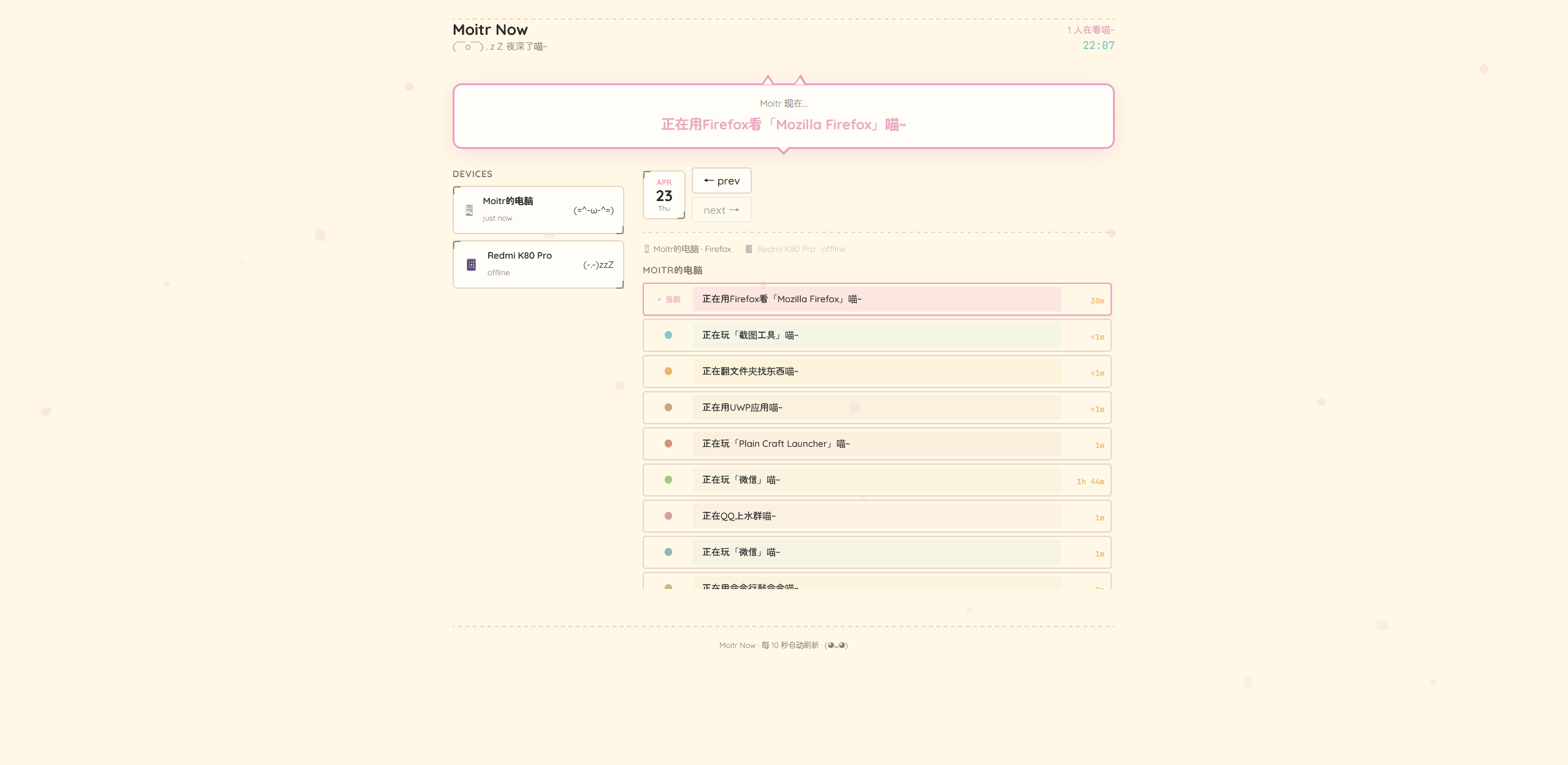
Screenshot
Wrapping Up
Everyone's welcome to come creep on me: Moitr Now (now closed)